The audit log
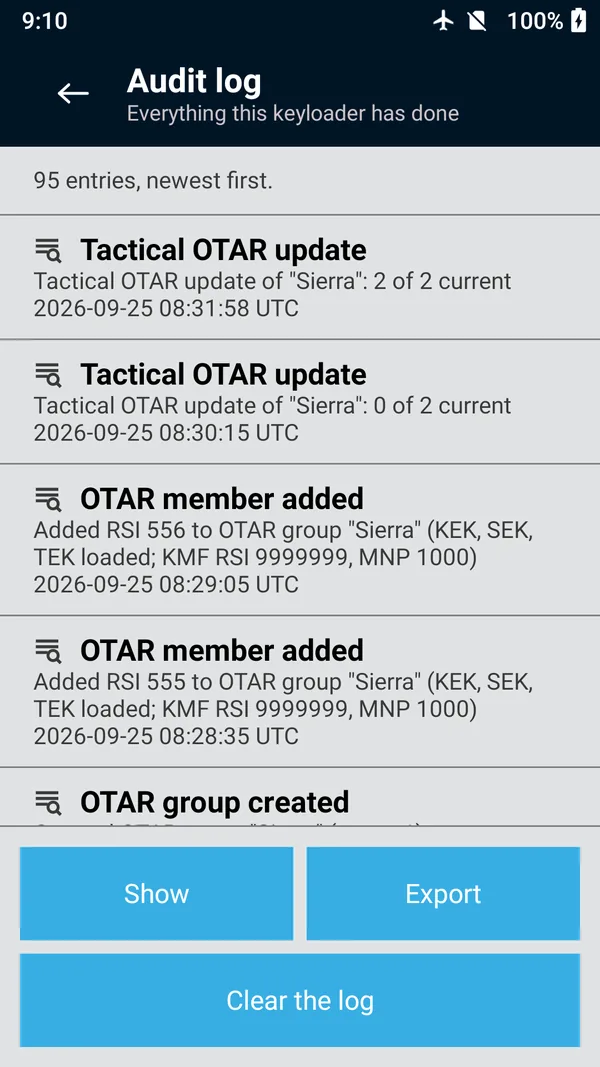
Every action that moves, changes or destroys key material is recorded on the unit. View it, filter it by action, and export it as a report to a USB drive.
Open Audit log from the main menu. Entries are listed newest first, each with its action, a description, and the time in UTC.
The log records, among other things:
- Keys added, generated, changed or deleted on the unit, and groups created, changed or deleted
- Keys loaded to, read from and erased from a radio, and groups loaded
- Keys shared with or received from another keyloader
- Key containers imported or exported, and console XML exported
- Changes made with Configure a device
- KMF sessions, jobs forwarded, and KMF settings and UKEK changes
- Radio authentication: radios provisioned, AuC sessions, reports exported
- Tactical OTAR groups, members and updates
- The clock or time zone set, the keyloader restarted, the license installed, the terms accepted, and the log cleared
Entries describe what was done and to what (key names, algorithms, key IDs, RSIs), not key values.
 (enlarge)
Filter the log
Tap Show.
Choose an action, for example Keys loaded to a device. Only actions that appear in the log are offered. The screen's title changes to the filter's name.
To see everything again, tap Show and choose All actions.
Export the audit log
Plug a USB drive into the unit's USB-A port.
In Audit log, tap Export.
Choose the USB drive in the save dialog and save. The unit writes an HTML report titled
KFDPro audit log
, with columns for the time (UTC), action, detail and data. The result readsLog exported
.
Open the report in any web browser on a computer. It can be printed or kept with your records.
Clear the log
Tap Clear the log and confirm Clear the audit log?
; with a PIN set, you then enter your PIN. Every entry is deleted and can't be recovered, so export the log first if your policy requires you to keep it. The clearing itself is the first entry of the new log.
How much it holds
The log keeps the most recent 10,000 entries. Past that, the oldest entries are dropped as new ones arrive. Export it regularly if you need a complete history.
Times are recorded in UTC from the unit's clock. If they look wrong, set the clock in Date and time.